What Does Collate Mean When Printing? Simple Guide
Introduction
If you’ve ever printed multiple copies of a document, you’ve probably seen the option “collate”—but what does it actually mean? Understanding collate printing can save you time and effort, especially when handling multi-page documents. This guide explains everything in a simple, practical way.
What Does Collate Mean in Printing?
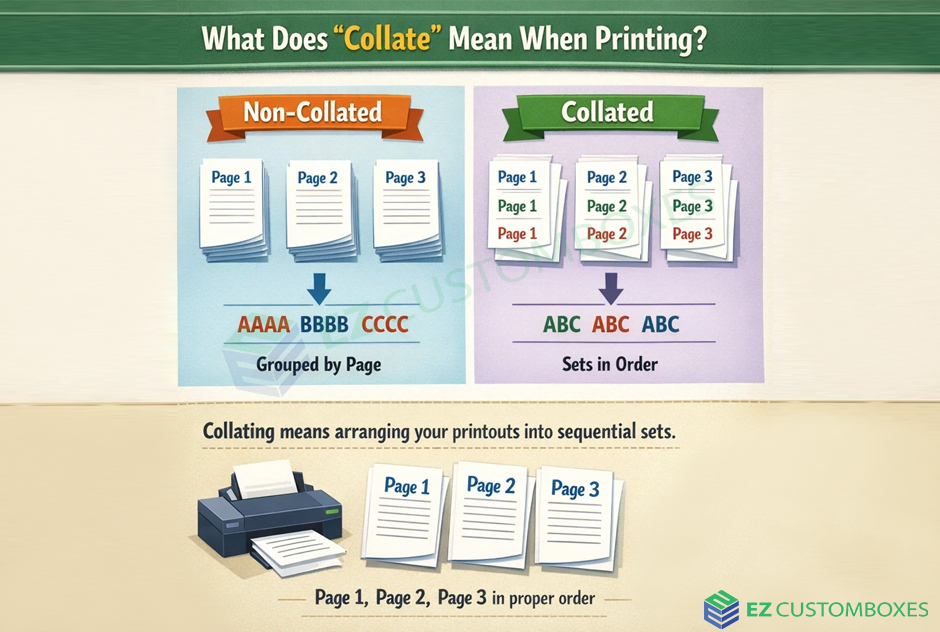
The collate printing meaning means arranging printed pages in the correct order for each complete set.
Example:
If you print 3 copies of a 5-page document:
- Collated: 1-2-3-4-5, 1-2-3-4-5, 1-2-3-4-5
- Uncollated: 1-1-1, 2-2-2, 3-3-3, 4-4-4, 5-5-5
Why Is Collate Important in Printing?
Using the collate option in printing helps you:
- Save time on manual sorting
- Keep documents organized
- Improve workflow efficiency
- Prepare professional reports or presentations
Collate vs Uncollate Printing
Collated Printing
- Prints complete document sets
- Best for reports, booklets, and assignments
- Ready to use immediately
Uncollated Printing
- Prints grouped pages (all page 1s, then page 2s)
- Useful for bulk distribution or binding
- Requires manual sorting
When Should You Use Collate?
Use collate printing when:
- Printing multi-page documents
- Preparing presentations or handouts
- Creating booklets or reports
Avoid it when:
- Printing single-page documents
- Sorting pages manually for special tasks
How to Enable Collate in Printing
Follow these simple steps:
- Open the print dialog (Ctrl + P)
- Look for the “Collate” checkbox
- Select it before printing multiple copies
- Click print
Most modern printers and software support this feature.
Common Uses of Collated Printing
- Office reports
- School assignments
- Business presentations
- Manuals and guides
Frequently Asked Questions (FAQs)
What does collate mean in printing?
The collate printing meaning correct order for each document set.
Should I print collated or uncollated?
Choose collated for ready-to-use documents and uncollated if you want grouped pages for manual sorting.
Does collate matter for single-page printing?
No, collate only matters for multi-page documents.
How do I know if my printer is collating?
Check the print preview or settings if pages are arranged in order per set, collate is enabled.
Is collate printing faster?
It may take slightly longer to print, but it saves time by eliminating manual sorting.
Conclusion (CTA)
Understanding what collate means when printing helps you print smarter, not harder. Whether you’re working on school projects or office reports, using the collate feature keeps everything neat and organized.
Next time you print multiple pages, turn on “collate” and see the difference!









Post Comment