What Is a Database Schema?
How Everyday Apps Secretly Rely on Databases
Think about a normal evening. You open Swiggy or Zomato, pick a restaurant, place an order, track the rider, and later check your order history. On a different day, you pay a friend on PhonePe or Google Pay and then scroll through your UPI history. Maybe you finish the night by watching a show on Netflix or Disney+ Hotstar, which remembers exactly where you stopped last time. All of this feels smooth and obvious on the screen.
Behind every one of those screens sits at least one database. That database stores your account details, saved addresses, past orders, payments, favourite items, watch list, and much more. But it is not just a big messy list of information. It is organised very carefully so that when you tap on “Past Orders” or “Transaction History,” the app can instantly find only the records that belong to you and show them in the right order.
For this to work, the app’s data cannot be thrown around randomly. Developers plan a structure first: what kind of information will be stored, which pieces belong together, and how one kind of information connects to another. That planned structure is what people in tech call a database schema.
What a Database Schema Is in Simple Terms
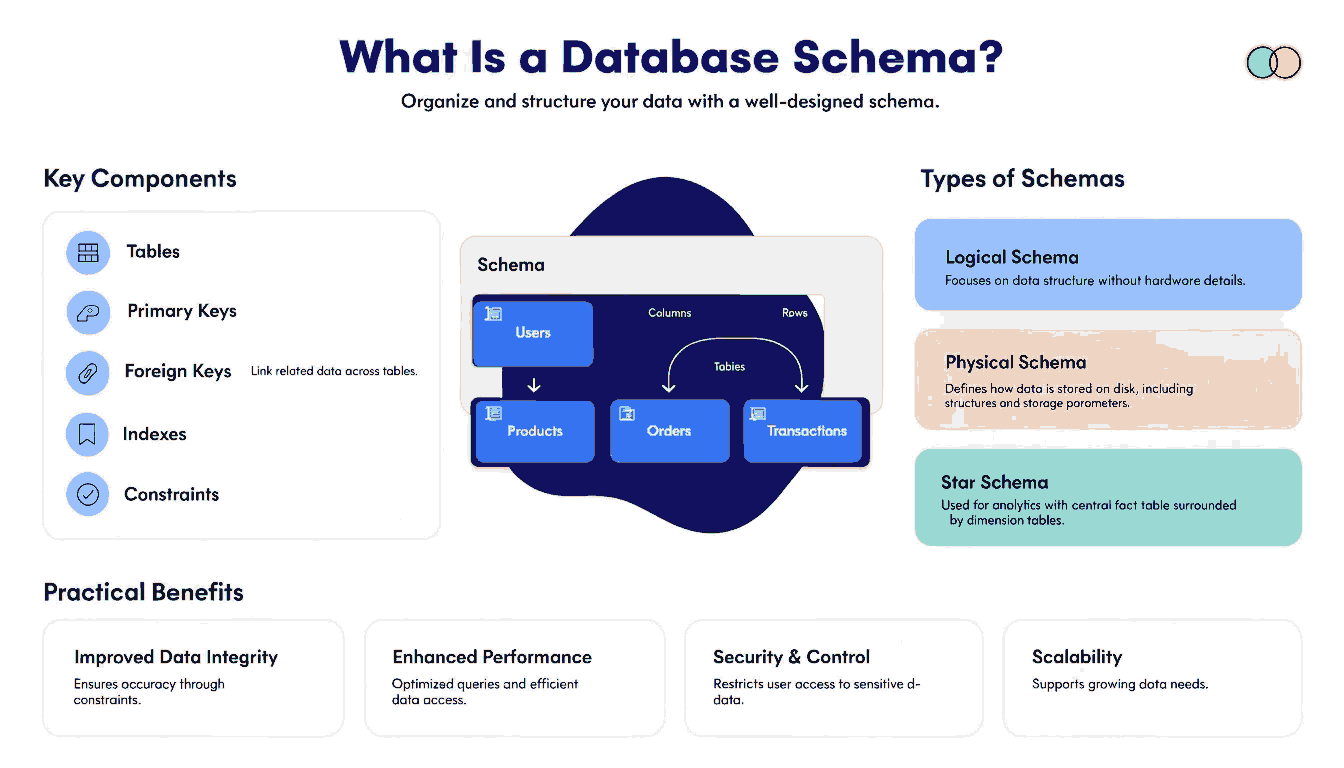
A database schema is the blueprint or design for how data is organised in a database. It answers questions like: What tables will we have? What columns will each table contain? Which column stores a phone number, which stores a price, which stores a date? How do we link a customer to their orders or payments? The schema is the plan; the actual stored records are the result of following that plan.
One way to picture it is as an empty form or an Excel template. Before anyone fills it in, the form already decides which boxes exist: name, email, address, phone, amount, and so on. Your answers are the data. The layout of the form is the schema. In the same way, a database schema describes the layout: which tables exist, which columns each table has, and what kind of values are allowed in each column.
It also helps to separate a few words that are often mixed up. A database is the whole storage area: all the tables and data together. A table is one organised set of similar records, like all customers or all orders. The schema is the structure that defines how those tables are organised, what each column means, and how tables link to each other. When someone says this app’s schema is well designed, they are talking about that structure, not about how many users or orders are currently stored.
In more advanced systems, concepts like Database Schema Design for Consent Artifacts and Purpose Metadata also come into play, especially when applications need to track not just data, but the reason and permissions behind how that data is collected and used.
Main Building Blocks of a Schema: Tables, Columns, and Keys
To make this concrete, imagine a simple food-delivery app focused just on one city. Its database might have tables for Customers, Restaurants, Orders, OrderItems, Addresses, and Payments. Each of these tables stores one kind of thing. Customers hold your basic profile and login details, Restaurants list each place you can order from, Orders store each order you place, OrderItems list the individual dishes inside each order, Addresses store saved delivery locations, and Payments record how that order was paid for.
Inside each table are rows and columns. Every row is one record: one customer, one restaurant, one order. Columns are the fields that describe that record, such as customer_name, phone_number, email, created_at, or total_amount. Each column also has a data type that says what kind of value is allowed there, for example an integer for a quantity, text for a name, a decimal number for a price, or a date-time for when the order was placed.
To keep track of records reliably, schemas use keys. A primary key is a column that uniquely identifies each row in a table. Foreign keys create the links between tables, helping the database understand relationships between data. Constraints such as NOT NULL, UNIQUE, and CHECK rules help prevent invalid or inconsistent data.
Different Levels and Types of Database Schemas
Three common ways of looking at a database schema include:
- Conceptual schema: High-level design of what data exists and how it relates
- Logical schema: Tables, columns, keys, and relationships
- Physical schema: Storage, indexing, and performance details
Each level focuses on a different aspect of how data is structured and used.
How Schemas Appear in Real Tools: Diagrams and SQL Code
Schemas are usually represented in two main ways:
- Schema diagrams: Visual representations with boxes (tables) and lines (relationships)
- SQL code: CREATE TABLE statements that define tables, columns, and constraints
Both formats represent the same structure—one visual, one technical.
Why a Good Schema Matters for Speed, Safety, and New Features
A well-designed schema improves:
- Performance (faster queries)
- Data accuracy (through constraints)
- Security (controlled access)
- Scalability (easy feature expansion)
Poor schema design can lead to slow apps, messy data, and difficult updates.
Next Steps and Quick Answers to Common Doubts
Start small:
- Identify key tables
- Follow one data flow (like an order process)
- Practice reading CREATE TABLE queries
Over time, schemas will become easier to understand and design.
FAQs
Q1. Is a schema the same as a database?
No, a database is the full collection, while a schema defines its structure.
Q2. Do NoSQL databases have schemas?
Yes, but they are more flexible and often not strictly enforced.
Q3. How can I understand a schema diagram?
Start with main tables, identify keys, and follow relationships step by step.
Q4. Do I need advanced knowledge to learn schemas?
No, basic understanding of tables, columns, and keys is enough to begin.
Q5. Why is schema design important?
It ensures data is organised, consistent, and easy to use.










Post Comment